

Remote Play For PS4/PS5的官方開發商為Dynamic Remote,雷電模擬器只提供應用程式Apk下載服務。
版本1.5.7
更新日期2025-07-17
評分3.0
類型娛樂
應用程式檔名稱com.ldyt.ps4.ps5.remoteplay
下載數100+
Remote Play For PS4/PS5 簡介
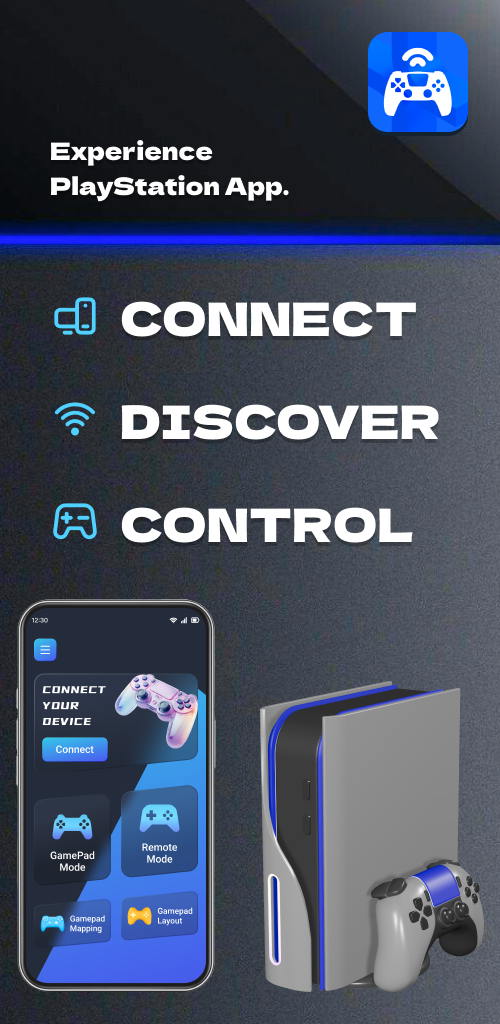
With smart Android devices, you can now remotely control and enjoy the fun of gaming more conveniently. Stream PlayStation visuals directly to your phone, and no matter where you are, you don't have to worry about the limitations of the TV. With just a few simple steps, connect your PS device and log in to your PS account to experience full remote playback and control features on your smartphone or tablet. 🌐
No Matter Where You Are, Remote Play for PS4/PS5 Gives You Full Control Over Your PlayStation 5 or PlayStation 4 Console. 🎮
Main Features:
Use Remote Play for PS4/PS5 as a virtual DualShock controller for PlayStation 5/PlayStation 4 🎮
Stream from PlayStation 4/PlayStation 5 to your device with ultra-low latency ⚡
Use the screen controller on your mobile device as a second screen for PS games, controlling your PlayStation 4 and PlayStation 5 📲
Support for third-party, DualSense/DualShock, and physical controllers on all Android devices 🎮
Steps to Use Remote Play for PS4/PS5:
Ensure your router is configured to allow remote play 🖥️
Log in to your PlayStation Network account 🔐
Make sure your PlayStation 4 or PlayStation 5 console system software is up to date 🔄
Connect to a high-speed internet (home Wi-Fi network) 🌐
Use a mobile device with Android 7.0 or higher installed 📱
Use Remote Play for PS4/PS5 as a virtual DualShock controller for PlayStation 4/PlayStation 5 🎮
What Remote Play for PS4/PS5 Supports:
Supports Android TV devices 📺
Supports PS4 firmware version 5.05 and above 🖥️
Supports PS4/PS5/PlayStation 4/PlayStation 5 consoles with the latest system software 🎮
Remote Play for PS4/PS5 allows you to remotely control and play any PS4/PS5/PlayStation 4/PlayStation 5 games that support remote play 🌐
Enjoy the Following Games:
FIFA 21, FIFA 22 ⚽
God of War, Horizon Forbidden West 🎮
GTA V, The Last of Us 🚗💀
And all the games on your device 🎮
Or use Remote Play for PS4/PS5 as a virtual DualShock game controller for PlayStation 4/PlayStation 5 📱🎮
Disclaimer/Trademark:
-This application is not affiliated with Sony or its subsidiary brands, nor is it an official application of Sony. 🚫🎮
Contact us: cs@ldyt.online 📧
If you would like to learn more about us, please visit https://ldyt.online for details. 🌐
展開


目前暫不提供Remote Play For PS4/PS5的APK檔下載,請前往GooglePlay下載。
從 Google Play 獲取。
1. 點擊「從 Play Store 獲取」
2. 從 Play Store 下載 Remote Play For PS4/PS5
3. 啟動並享受 Remote Play For PS4/PS5
Remote Play For PS4/PS5 對我的電腦設備來說安全嗎?
展開
是的,Remote Play For PS4/PS5 遵循 Google Play 的內容指南,確保您在您的 Android 設備上安全使用。
什麼是XAPK檔案?如果我下載的Remote Play For PS4/PS5是XAPK檔案怎麼辦?
展開
XAPK是一種檔案擴充格式,單獨的APK檔案和OBB cache assets檔案。
XAPK檔案可以簡單透過手機上的預設安裝器直接下載安裝到Android裝置。
XAPK檔案可以幫助你在手機或平板下載或傳輸大型應用程式時節省很大的資料容量。XAPK檔案甚至可以讓你毫無障礙地下載和安裝受區域限制的應用程式。
XAPK檔案不像APK檔案可以簡單透過手機上的預設安裝器直接下載安裝到Android裝置。APKPure XAPK 安裝器可以透過最方便的方式幫你一鍵安裝和管理Android裝置上的APK和XAPK檔案。
具體安裝教學可以透過以下連接查看:https://apkcombo.com/tw/how-to-install/
而在電腦上只需拖拽XAPK檔案至雷電模擬器中即可。
我可以在電腦上玩Remote Play For PS4/PS5嗎?
展開
是的,你可以透過在電腦上安裝雷電Android模擬器,然後將你下載好的 APK 檔案拖入運行的模擬器內,即可開始在電腦上玩Remote Play For PS4/PS5。您也可以打開模擬器,搜尋你想要玩的遊戲或應用程式進行安裝。
其他語言版本
Download Remote Play For PS4/PS5[EN]
PS4/PS5용 원격 플레이 다운로드[KR]
Tải Chơi từ xa cho PS4/PS5[VI]
ดาวน์โหลด การเล่นระยะไกลสำหรับ PS4/PS5[TH]
Скачать Remote Play For PS4/PS5[RU]
Baixar Remote Play For PS4/PS5[PT]
Descargar Juego remoto para PS4/PS5[ES]
Télécharger Lecture à distance PS4/PS5[FR]
Remote Play für PS4/PS5 herunterladen[DE]
Remote Play For PS4/PS5をダウンロード[JP]
تنزيل اللعب عن بعد لـ PS4/PS5[AR]


